

Override default rate limits for specific identifiers directly from the dashboard. No code changes or deploys needed, changes roll out globally in seconds.
When to use this#
Enterprise customers need higher limits than your default tier.
Integration partners building on your API need room to grow.
Reduce limits for suspicious users without blocking entirely.
Temporarily increase limits for specific test accounts.
How it works#
- You define default limits in your code
- Create overrides in the dashboard for specific identifiers
- When that identifier is rate limited, Unkey uses the override instead of the default
Override priority: Exact matches > Wildcard matches > Default limits
Create an override#
Go to your namespace
Click Ratelimit in the sidebar → select your namespace → Overrides tab.
If you don't have a namespace yet, create one first.
Add the override
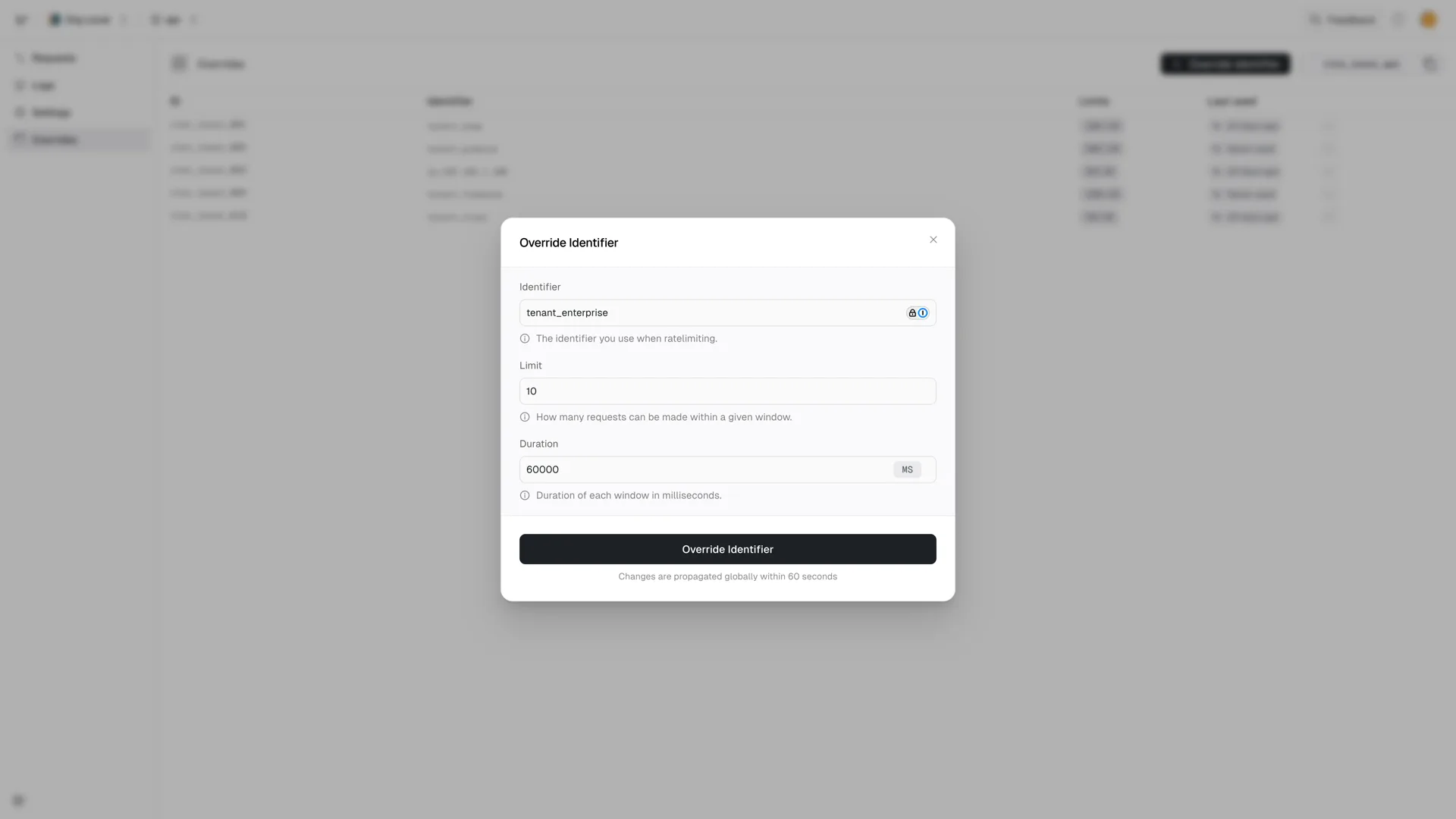
Enter:
- Identifier: The exact identifier or wildcard pattern
- Limit: Custom request limit
- Duration: Time window for the limit
Save
Click Override Identifier. Changes propagate globally within ~60 seconds (usually much faster).
Example: Enterprise customer#
Your default limit is 100 requests/minute. Acme Corp needs 10,000/minute.
| Identifier | Limit | Duration |
|---|---|---|
acme-corp | 10000 | 60s |
Now when acme-corp hits your API, they get 10,000/min instead of 100/min.
Wildcard patterns#
Use * to match multiple identifiers at once.
Examples#
| Pattern | Matches |
|---|---|
*@acme.com | alice@acme.com, bob@acme.com, api@acme.com |
enterprise:* | enterprise:123, enterprise:acme, enterprise:test |
user_*_prod | user_123_prod, user_abc_prod |
Priority#
Exact matches always win over wildcards:
| Override | Limit |
|---|---|
*@acme.com | 500/min |
ceo@acme.com | 10000/min |
Result:
ceo@acme.com→ 10,000/min (exact match)anyone-else@acme.com→ 500/min (wildcard match)user@other.com→ default limit

Managing overrides via API#
Create overrides programmatically:
This enables workflows like:
- Automatically increasing limits when users upgrade
- Syncing limits from your billing system
- Temporary increases during promotions
Common patterns#
Tier-based limits#
Use prefixed identifiers in your code: ${plan}:${userId}
Domain-based limits#
Temporary boost#
Need to give someone extra capacity for a demo or migration? Add an override, then remove it when done. No code changes needed.
Removing overrides#
Delete an override from the dashboard or API. The identifier immediately falls back to default limits (or the next matching wildcard).